Over the past month, my team and I took the opportunity to deploy MCP servers into production to power AI-driven observability workflows.
In this article, I will be sharing the rationale for building them, the design decisions we made, and the lessons learnt along the way.
To recap from my previous article,
Model Context Protocol (MCP) servers are services that define tool functions that can be used to talk to external datasources/services. AI clients can establish a connection with them like a USB adapter, and invoke these tools when the LLM requires it.
On a high-level, it act as an API service for AI applications to access tool functions. Without MCP, these tools will have to be defined locally within the AI client's application layer.
Rationale
Observability datasources like Prometheus and Clickhouse are heavily used by both operation and application teams to monitor and triage issues in our infrastructure.
Prometheus is the backbone metrics store while Clickhouse is an OLAP database that we have incorporated as our central logs store.
Operations personnel are expected to learn these technologies as part of their daily duties so that they can query relevant metrics and logs fast to detect warning signs and pinpoint problems ahead of time.
For application developers, they are initially focused on meeting their core feature requirements. Afterwards, observability is a secondary requirement prior to production roll-out.
Within this ecosystem, there were plenty of inefficiencies observed:
-
Steep learning curve for first-time users on domain specific languages - Prometheus Query Language (PromQL), Clickhouse Query Language (CQL), etc.
-
Manually querying metrics and logs is time-consuming.
-
Incident investigations can sometimes last several hours.
-
Application onboarding to our observability infrastructure is often a rushed process.
Due to these pain points, there is a strong motivation for our team to
-
Simplify the complexities of these languages for easier learning.
-
Automate and summarise the investigation process.
-
Speed up onboarding of application teams to our observability platform.
One interesting observation was that with a grown interest in Agentic AI development within our organization, many teams are requesting to access our datasources programmatically via API, to automate the time-consuming processes. We found this trend impractical for several reasons:
-
Duplicated efforts.
Many teams will end up re-inventing the wheel by developing the same if not, similar API wrappers on top of our datasources.
-
Potentially expensive queries developed with bad practices.
We have no control over the queries sent to our downstream which if many are defined inefficiently, can impact the tail read latencies.
-
Inconsistency in outputs.
We want to ensure that users get the data they want consistently. As these are domain-specific and have a steep learning curve, human errors and misinterpretation are common. We cannot confirm if the programmatic wrappers are returning outputs in formats that are desirable to clients.
-
No metrics to track AI queries.
Without a centralised gateway, we will not be able to identify query patterns made by AI applications. These are missed opportunities that could be used to tune our downstream datasources to support these patterns.
To address these challenges, we designed a shared MCP gateway that sits between AI clients and our observability MCP servers. This gateway acts as a control layer that enforces authentication, rate limiting, monitoring before requests reach downstream data sources.
Design Decisions
Requirements
The idea was to build a dedicated MCP server for observability tool functions that can be consumed by any user or AI client. We arrived at the following requirements.
Functional
- Cover a wide set of tool functions that interact with our observability ecosystem (Prometheus, Clickhouse, and other databases and services). Examples include:
- Fetching metric metadata.
- Calling PromQL queries.
- Fetching Clickhouse table schemas.
- Running Clickhouse queries.
Non-functional
- It must be easy to maintain.
- It must be easy to extend new features.
- It must be secured with authentication.
- We must be able to track and control incoming requests.
- We must avoid causing resource contention with downstream services.
- The tools must be intuitive to use.
From the above, it's similar to building a secure API gateway but for AI clients, with high priority on the non-functional requirements.
From our research, we realised there are infinite ways to build a gateway.
Thankfully, the open-source community is extremely passionate when it comes to MCP related products, frameworks and SDKs. We took inspiration from these open-source solutions, assessed which library was the easiest to use and eventually arrived at the following architecture.
Architecture
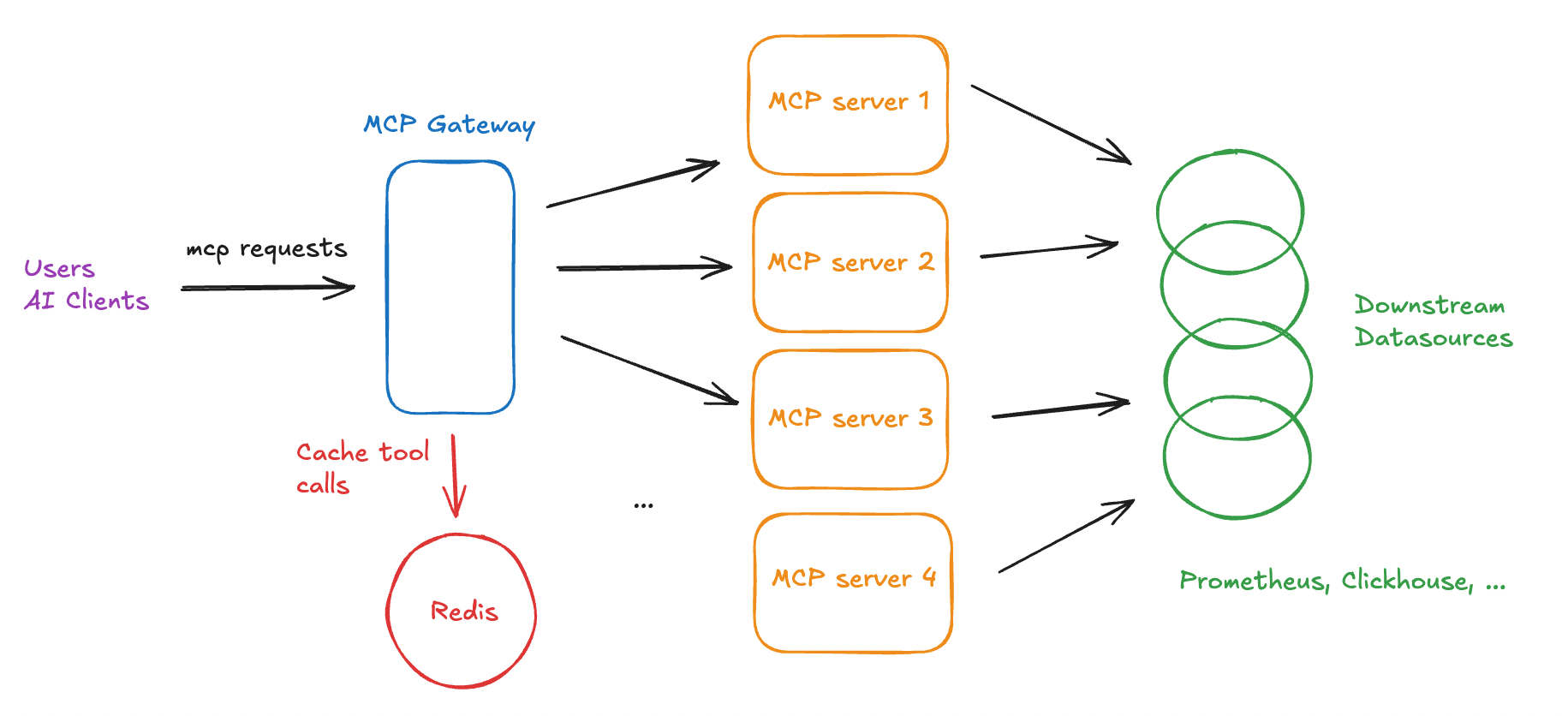
Technology Stack
Python is easy to pick up and seems to be largely adopted by the open-source community. We arrived at this library because it's feature-rich, developer-friendly and supports proxying MCP servers.
MCP servers
In addition to the above open-source solutions, we also built other custom toolsets for internal/legacy services.
Combining MCP server toolsets
One question we asked ourselves was how do we combine these toolsets under a single service?
There were several options we could do to accomplish this:
-
Combine the tool functions from all the codebases and run it as a single MCP server process.
-
Run these MCP servers separately, with an additional gateway component that centralises rate-limiting, client-side authentication and proxies requests to the correct MCP server underneath.
-
Run these MCP servers separately with their own middleware for rate-limiting and client-side authentication.
We eventually decided on Option 2: a dedicated MCP gateway that proxies to individual MCP servers for several reasons.
-
Clear segregation of responsibilities. Each MCP server manages its own toolsets and authentication mechanisms with downstream services.
-
We just need to define the client-side authentication logic once in the gateway component. The alternative would be duplicating the same auth logic in each MCP server middleware, which is more tedious to maintain in the long-term.
-
Is it possible to proxy the requests to the underlying servers? Thankfully, the fastmcp library supports proxying. Case closed.
-
Easier to maintain and extend newer toolsets. If we want to remove a toolset due to a bug, we can easily detach it from the gateway config. Likewise, if we want to extend the global toolset, we can plug in a new MCP server.
Authentication
For a start, we opted for Basic Authentication using a FastAPI server for receiving login requests.
To accept login requests, we kept it simple by building a login endpoint, which connects to our internal LDAP server. We return a token from these requests.
The client is expected to pass this auth token to the request headers when calling the /mcp endpoint.
Proxy Configuration
A JSON file that configures the proxy server to talk to underlying MCP servers. This schema allows us to easily remove or integrate new toolsets along the way.
"mcpServers": {
    "prometheus": {
        "url": "https://localhost:5000/mcp",
        "transport": "http",
        "headers": {
            "Authorization": "<>"
        }
    },
    "clickhouse": {
        "url": "https://localhost:4200/mcp",
        "transport": "http",
        "headers": {
            "Authorization": "<>"
        }
    },
    "custom": {
        "url": "https://localhost:3000/mcp",
        "transport": "http",
        "headers": {
            "Authorization": "<>"
        }
    },
    ...
}
Authentication
We implemented a token logic check within the on_request handler inside the gateway component's middleware. For any invalid or expired token, we deny the request.
from fastmcp.server.dependencies import get_http_headers

class AuthMiddleware(Middleware):
    async def on_request(self, context: MiddlewareContext, call_next):
        result = await call_next(context)
        headers = get_http_headers()

        if not validate_token(headers.get('token')):
            raise McpError(ErrorData(code=-32000, message="Token is either expired or invalid"))
        return result
Rate-limiting
We implemented Rate Limiting Middleware in our proxy to handle rate-limiting.
from fastmcp import FastMCP
from fastmcp.server.middleware.rate_limiting import RateLimitingMiddleware

mcp = FastMCP("MyServer")
mcp.add_middleware(RateLimitingMiddleware(
    max_requests_per_second=10.0,
    burst_capacity=20
))
Monitoring
At the point of development, we used Prometheus client library for writing metrics to track incoming login and mcp requests.
Eg:
# Track incoming mcp requests
mcp_request_count{status=<200|300|400|...>, mcp_server='underlying server prefix'}
# Track incoming login requests
login_request_count{status=<200|300|400|...>}Today, the fastmcp library has grown significantly, with support for native OpenTelemetry integration.
Caching
We consider caching if we predict scenarios when downstream services might be overwhelmed with expensive queries or high read traffic.
Proxy middleware has three main handlers that are performed before forwarding the request to the underlying MCP server for processing.
- on_request
- on_list_tool
- on_call_tool
For tool calling, we are mainly interested in the on_call_tool handler.
Let's examine how a MCP tool invocation flow with a gateway component works:
(Client) Tool invocation Request
        (MCP Proxy) -> on_request  -> on_call_tool
                (MCP Server)  -> tool function -> External API
From the above diagram, when a tool invocation request is received,
- It first enters the
on_requesthandler, which validates the auth token. - The
on_call_toolhandler relays the request to the downstream MCP server for invocation. - MCP server invokes the tool function.
- The result from the MCP server is propagated upwards back to the client.
We can inject the caching logic in the on_call_tool handler to prevent duplicate tool computations for frequent input arguments.
from fastmcp.server.middleware import Middleware, MiddlewareContext

class CachingMiddleware(Middleware):
    async def on_call_tool(self, context: MiddlewareContext, call_next):
        tool_name = context.message.name # Tool Name
        args = context.message.arguments # Tool Arguments

        if (tool, args) in cache:
            return cache[(tool,args)] # Return from cache immediately

        result = await call_next(context) # Forward request

        cache[(tool,args)] = result # Cache result

        return result # Return result
The above is a custom caching implementation for tool calls. TTL will need to be considered if you need to control cache growth. It's up to you if you want to integrate it using an in-memory map or a remote caching layer like Redis depending on your infra requirements.
Likewise, the fastmcp library supports Storage Backends that simplifies the implementation of caching.
Other design considerations
Multi-tenancy
For most MCP servers, they are designed to interact with a single downstream host out of the box.
Examples:
- mySQL MCP is configured to talk to a single database host.
- Prometheus MCP is configured to communicate with a single Prometheus/Thanos endpoint.
- Clickhouse MCP connects with a single Clickhouse cluster.
- OpenSearch MCP talks to a single opensearch url.
We have the option to
-
Deploy a single MCP server instance per downstream host
OR
-
Configure a single MCP server instance to be able to talk to multiple downstream hosts at once (which requires a code change to support that).
The decision to do one or the other comes with benefits and tradeoffs:
-
Single MCP server talking to downstream host
-
Pros
-
No code change required. Each MCP server has its own configuration.
-
Each MCP server has its own responsibility of directing traffic to a downstream node. If a downstream node is down, we can easily pinpoint from the status of each MCP server.
-
Fast tool invocation requests if both MCP and downstream processes are located in the same node.
-
-
Cons
-
If we have more than 10 instances to manage, there will be additional overhead to manage and monitor the health of each MCP instance.
-
There might be resource contention or need for extra resources. If we choose to deploy the MCP instance + downstream instance in a single node, they compete for the same CPU and disk space. If we separate them, we need N extra servers for N downstream nodes. Containerisation can help to resolve this deployment nightmare, but we have another challenge.
-
If an AI client has to access data from two or more endpoints, it will have to decide between (no. of tools)*(no. of endpoints). From the client perspective, the more tools it has, the more difficult it is for the client to decide which tool to invoke.
For example, let's say an MCP server has a set of 4 tools.
mcp_server: {
        tool1,
        tool2,
        tool3,
        tool4
    }
If there are 2 downstream services, we will need 2 number of MCP servers. The tool schema might look something like this from the AI client's perspective.
mcp_server_1: {
    1_tool1, # Prefix of 1 represents the tool for service 1
    1_tool2,
    1_tool3,
    1_tool4,
}

mcp_server_2: {
    2_tool1, # Prefix of 2 represents the tool for service 2
    2_tool2,
    2_tool3,
    2_tool4
}
Because the MCP servers are treated as distinct endpoints, the AI client is expected to interpret a total of 8 tools, which is not practical. Imagine having 10 or 20 of these services, the client needs to decide between 40 - 80 tools!
-
-
-
Multi-tenant MCP server that talks to all downstream hosts
-
Pros
-
Single MCP server manages the routing of requests to downstream nodes. This meant a more concise toolset selection from the AI client's perspective. Eg.
mcp_server: {
    list_tenants,
    tool1,
    tool2,
    tool3,
    tool4
}
This way, the AI client can just adjust its system prompt to first inspect the tenant list first before making a call to any of the tools 1-4.
-
Easier to deploy and manage a single MCP server as it's a stateless service (1 vs N MCP servers)
-
-
Cons
-
A code change is required to load the tenant mapping and ensure each tool accepts a new tenant input parameter.
-
Code change must be tailored to account for downstream failures. This means there needs to be logic added to inspect the healthchecks for each underlying downstream node.
-
Firewalls need to be open if the downstream nodes exist in different network zones.
-
Some network latency might be experienced if the MCP server is located far away from the downstream.
-
-
On our end, we opted for the latter which although required some code change to support multi-tenant configurations, it came with the benefits of easier management, deployment and less resource contention.
We were also able to accept some latency on the MCP execution flow, so long as the tool invocation is done correctly without interfering with the downstream tail read latency.
Guardrailing the tool functions
We also added the following safeguards to harden the tool functions. This is to avoid creating situations where AI clients exhaust the downstream nodes which might impact the tail read latency for users who are directly querying them.
-
Enforcing client-timeouts.
-
Enforcing LIMITs in SELECT queries with a maximum threshold, like 100.
-
Looking up and blacklisting specific expensive or long-running queries.
Examples of bad queries:
-
Counting every time-series in Prometheus
count({__name__=~".+"}) -
Scan all columns from disk in Clickhouse
SELECT * FROM events WHERE event_timestamp = '2026-03-15'
-
When should you not adopt the above approach?
Our team opted to build and host a MCP gateway because we foresee a huge demand from AI clients. Thus, we require the ability to horizontally scale, monitor the connections, and desire the flexibility of integrating new MCP servers in the long term.
The decision to adopt a similar architecture might change if the following situations apply to you:
-
All tools can be defined in a single MCP server and there is no long-term goal of categorising or extending this toolset.
-
You do not need a separate gateway/proxy component if there is no intention to decouple your toolsets into different detachable units.
-
You can simply define the auth logic directly on your MCP server's middleware layer.
-
-
You do not plan to expose MCP servers for external use. You just want to host your MCP server with exclusive access to a parent application.
-
No proxy for authentication is required as the MCP server is coupled to your parent application.
-
If the MCP server is not shared, you can keep it simple by spawning it as a child process (stdio) for your parent AI client process to use in the same node.
-
You do not intend to share MCP servers for external use - No gateway component needed.
-
-
You are ok to expect the AI client to be aware of which downstream client it is getting data from.
-
Multi-tenancy is not needed here if your AI client is able to decipher the tools across its MCP server connections.
-
Eg. There are 3 MCP servers connected to 3 different downstream mySQL hosts, but your AI Client only needs to establish a connection to 1 of them, there is no need to implement multi-tenancy logic.
-
Lessons Learnt
1. Misconception in MCP Clients and Servers
When approaching MCP server development, it is very often that we hear questions like:
-
Where does the intelligence lie in MCP servers?
-
How does the LLM invoke the tool?
The below definitions hope to demystify the different responsibilities between client and server in the MCP world.
-
The server holds the function definitions that run deterministically based on input arguments.
-
The client establishes connection with the server, to query the list of function definitions and send requests to the underlying MCP server to invoke the tool function if the Large Language Model (LLM) intends to execute it during its thinking process.
The decision to call a tool depends on a combination of factors:
-
LLM model selection
-
System prompt
-
Tool description
-
User prompt
If the tool is not described intuitively, the LLM model will find it difficult to correlate between the user prompt and the tool function.
2. Bad practices in tool functions
-
Too large outputs.
It might be tempting to define functions that return as much information as possible (a long array of complex JSON objects). This is not recommended as ultimately, this information is passed to your LLM for processing and summarisation. The LLM may either exceed its context window or end up burning costly input tokens during the summarisation step.
Stick to small, manageable JSON outputs. If needed, introduce a new tool or additional input arguments to avoid fetching unnecessary data.
Example:
get_all_definitions() -> [{item_id, ...metadata fields}] X Bad, all records fetched.Instead of defining a single get_all_definitions tool to fetch N records to read the definition of a specific item_id, we can make this more efficient by
-
Introducing a new tool (get_item_list) to get the available items first.
-
Implement an item_id filter on the get_definition function, to avoid fetching N-1 unnecessary records.
get_item_list() -> [item_id] # List of available item ids get_definition(item_id) # Additional item_id parameter -> {item_id, ...metadata fields} -
-
Overlapping/unnecessary tool functions.
It is important to also ensure segregation of responsibilities across your tool functions. Each tool function should serve a distinct purpose to ensure DRY and YAGNI principles are obeyed.
- Bad Example
get_item_name(id) -> string # Returns the item name
get_item_description(id) -> string # Returns the item description
Both of these could arguably be used to find an item's metadata. We can merge them into a single function if the output data is not very large.
Good Example
get_item_details(id) -> {item_fields} # Returns the item metadata in an object -
Ensure that tool functions work with each other.
The outputs of Tool A should naturally serve as the inputs for Tool B. Otherwise, it is not intuitive for the LLM and you may end up experiencing the previous issue of having unnecessary overlapping tools.
Bad Example
list_files() -> [file_name] # Returns list of file names
delete_file(file_id) -> Boolean # Deletes a file by file_id.
This is bad because the LLM will learn about the file names, but will not have knowledge of the file id required to perform the delete function.
Corrected Example
list_files() -> [{file_id, file_name}] # Returns list of file metadata objects that includes the file id.
delete_file(file_id) -> Boolean # Deletes a file by file_id.
The LLM will now be able to capture the file id from the object list in order to invoke the delete function.
Caveats when running MCP gateways
While deploying MCP gateways in production, we encountered a few transport and connection-related caveats that are worth highlighting.
-
Use streamable HTTP instead of SSE/STDIO
For production deployments, streamable HTTP provides scalability and modern compatibility with load-balanced environments compared to SSE/STDIO transports.
-
Enable stateless_http=True
Running the gateway in stateless mode prevents sticky sessions between clients and servers. This allows the service to scale horizontally behind a load balancer without routing requests to specific instances.
-
Managing SSE connections on the
/mcpendpointIf the
/mcpendpoint accepts GET, some MCP clients may interpret it as an SSE endpoint and attempt to establish a persistent streaming connection.This can lead to long-lived connections that consume server resources. If many clients open these connections simultaneously without closing them properly, the service may eventually run out of available connection slots and stop accepting new requests.
To avoid this issue, we can either
-
Implement logic to gracefully close the SSE connections on timeout using the
close_sse_streamfunction. -
Reject GET requests for the
/mcpendpoint by returning HTTP 405 Method Not Allowed to explicitly indicate that SSE is not supported.
-
Conclusion
This article sums up the rationale, different design decisions and the different lessons that I have learnt during this journey. I hope this serves as a good blueprint for anyone who is interested in architecting MCP servers for production environments.
Cheers and stay tuned for more!